|
|
|
|
|
|
EZ-NetTools eCommerce Suite > EZ-Catalog
|
|
|
|
|
|
- Product Option Variables
- Cross Category Display
- Simple Administration Screens
|
|
- Unlimited Items
- Unlimited Categories
- EZ-Order™
|
|
|
EZ-Catalog is a fantastic way to display products online. Sales catalogs have the potential to be difficult to develop and maintain and can cost a fortune. With EZ-Catalog, you have the power of EZ-NetTools to simplify the process and save you money. With EZ-Catalog, you enter your information.
Catalog Configuration
EZ-Catalog is a configurable product. In other words, you have many options to choose from that influence the way the catalog looks and functions. From a functional standpoint, you can choose whether or not to include:
|
|
- A Shopping Cart
- Links to Other Pages
- A Keyword Search
- A Link to the Order Form
|
|
From a design/display standpoint, you can choose whether or not to include:
|
|
|
- Borders around the Product
- Prices
|
|
|
You also choose:
|
|
|
- The sequence to list the products.
- The text colors to highlight the name of the product.
- The text colors of the product descriptions.
- The background colors for each area of the catalog.
|
|
|
|
In addition to all of the options above, you can also choose whether or not to include a keyword search! This works wonderfully for automobiles, real estate, and with other products that have distinctive attributes. This search allows the consumer to choose the options they are looking for and then the catalog will search the data base and present the available products that meet this criteria. For example, while shopping for a car, the consumer can search select a red, 4-door, mini-van, under $20,000, and the catalog will search the catalog database and display the cars meeting the consumers criteria!
The flexibility of EZ-Catalog with all of the configurable options makes EZ-Catalog a top of the line product in a class of its own!
|
|
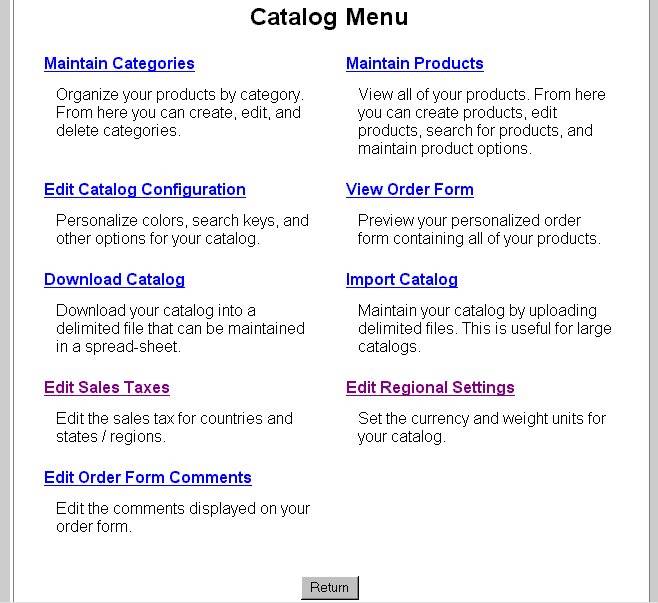
Maintain Categories
To manage a large list of products, EZ-Catalog organizes them into category groups. EZ-Catalog is uniquely suited to support an unlimited number of categories. Within each category, the Hostware can be used to create, edit, and delete categories with the click of a button. Organizing products by category makes the search for products more simple and the entire shopping experience more convenient.
Maintain Products
Product listings are very simple to enter too! The product entry process is very easy. Simply enter the information about the product into the online form and your product is ready to display on the Web.
When the catalog displays the product, the name, price, SKU, description, and multiple pictures can be displayed. EZ-Catalog makes it much easier for the consumer as they browse products online and for the merchant who has to manage them.
EZ-Catalog struts its versatility with multiple option products. The catalog uses drop down menus for the consumer to use to select the option they are interested in. With each selection, the pictures change to verify the product they want to purchase.
For example, shirts may come in a variety of sizes, colors, and collar styles. While the product is basically the same shirt, there are many variables associated with it. The consumer uses the drop down menus to choose the size, color, and collar style. EZ-Catalog displays the respective picture of the shirt they want to purchase. This sets the mind of the customer at ease thus prompting them to purchase! EZ-Catalog works like a charm with multiple option products.
|
|
EZ-Order
For smaller lists of products, EZ-Order is a terrific approach to selling online. With EZ-Order, an order form list is displayed. The consumer can then read down the list and choose how many of each product they want to purchase. EZ-Order tallies the total and processes the sale.
You can even display important messages on the order form that will provide information about the order.
EZ-Import
Many businesses have thousands of items for sale. To enter these in manually would take a considerable amount of time. EZ-Catalog includes a data import feature that will save days of data entry work. EZ-Import will upload the common data files. Specifically, either a comma or double-ampersand (&&) delimited file can be uploaded. With our fast and smooth running servers, the upload is quick and easy. Once the upload has been completed, the EZ-Catalog will immediately display the products with the style and functionality selected in the configuration area.
|
|
|
Download Catalog
Maintaining data of large catalogs can be a daunting task. To simplify this task, EZ-Catalog includes a catalog download option. This time saving feature provides the means to create a data file that can be saved on your hard drive. Using this download feature along with EZ-Import is a convenient and time saving duo.
Sales Tax
Even though consumers do not always have to pay sales tax when making a purchase over the Internet, some countries or regions within these countries require a sales tax. The sales tax feature of EZ-Catalog allows the merchant to choose countries and respective states, providences, or other regions where sales tax is required and then enter the sales tax to calculate in the online order. Simply point and click and your set to go!
Regional Settings
This handy feature sets the currency type and weight measurement method (pounds/kilgrams) that will be used in the order process. This feature makes international business over the web a more viable solution for many companies.
|
|
|
|
|
|
|